When you want to create a room that feels modern, fun, and full of personality, the right lighting can completely change the mood. In recent years, LED stripes have become a popular way to add color and excitement to bedrooms, gaming setups, living rooms, and even kitchens. Among the different types, two options stand out: Govee RGBIC stripes and standard RGB stripes. While they might seem similar at first, they have key differences that can make a huge impact on your experience.
If you’ve ever wondered why some people’s LED lights can show multiple colors at once, or why certain effects look so much more dynamic, you’re not alone. Choosing between Govee RGBIC and regular RGB stripes is not always easy, especially with so many technical terms and marketing claims. This article will break down the differences, show you what really matters, and help you decide which is right for your room. We’ll look at features, ease of use, design flexibility, and even long-term value, so you can make a choice you’ll be happy with every day.
What Are Rgb Stripes?
RGB stripes are flexible LED light strips that combine red, green, and blue diodes. By adjusting these three colors, you can create almost any color you want. Most RGB stripes can be cut to size and attached to almost any surface using adhesive. They are a popular choice for accent lighting under furniture, behind TVs, or along ceilings.
How Rgb Stripes Work
RGB stripes use a mix of red, green, and blue LEDs placed next to each other. By controlling the brightness of each color, you can make the strip glow in any shade—from soft pastels to bold primaries.
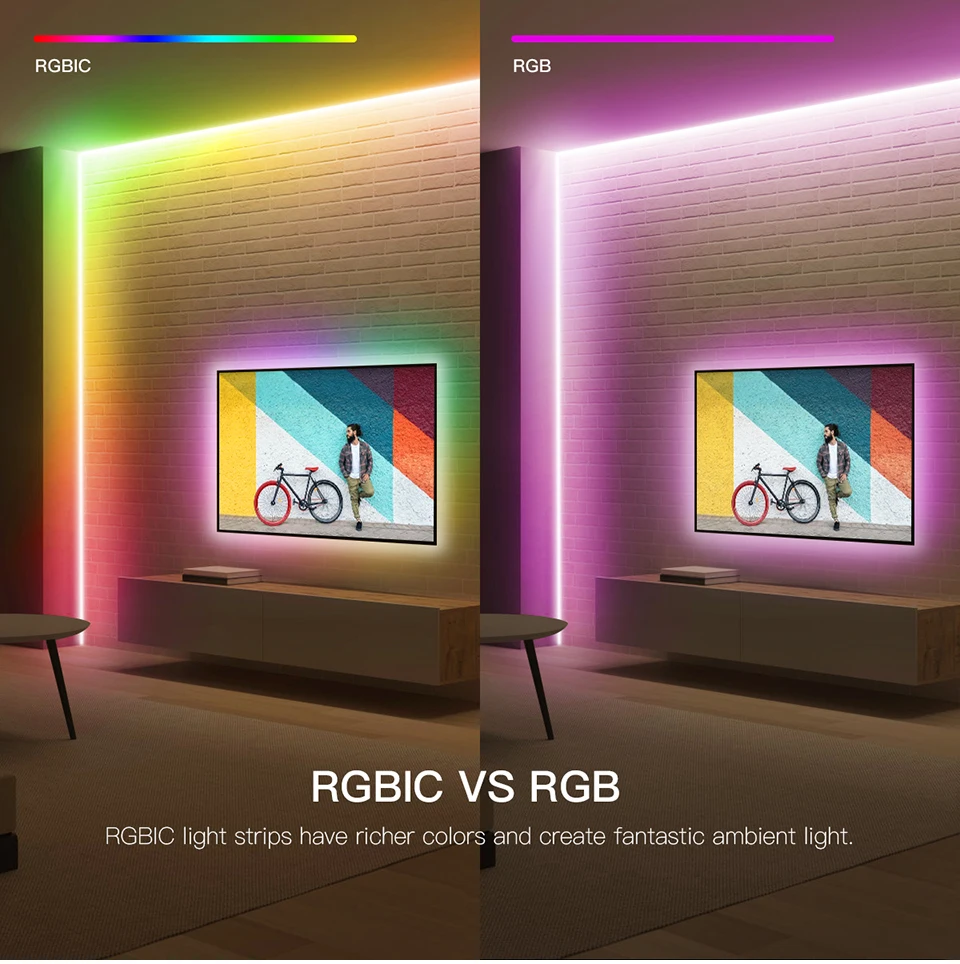
Most standard RGB stripes can only display one color at a time along the entire strip. That means if you set it to blue, the whole strip is blue. If you want a rainbow effect, you can only switch colors in sequence, not show multiple at once.
Common Features Of Rgb Stripes
- Simple remote control: Many come with a basic remote to pick colors and modes.
- DIY installation: Peel-and-stick backing makes setup easy.
- Affordable: Standard RGB stripes are often the cheapest LED strips.
- Limited effects: You might get flashing, fading, or simple color cycles, but not complex patterns.
Where Rgb Stripes Shine
RGB stripes are great for anyone who wants simple, colorful lighting without spending a lot. They work well for under-cabinet lighting, behind TVs, and along baseboards. If you only want one color at a time or simple effects, they’re a solid choice.
What Is Govee Rgbic?
Govee RGBIC stripes are a newer type of LED strip that uses a special technology called RGBIC. The “IC” stands for “Independent Control.” This means each segment of the strip has its own tiny chip, so different sections can show different colors at the same time.
How Rgbic Changes The Game
Instead of being limited to one color along the whole strip, RGBIC lets you create multi-color effects. Imagine a gradient from blue to purple to pink—all on the same strip, at the same time. Or a moving rainbow, fire effect, or even custom patterns that match your music or gaming setup.
Key Features Of Govee Rgbic Stripes
- Segmented control: Each part of the strip can glow in its own color.
- App control: Most Govee RGBIC stripes work with a smartphone app for advanced effects.
- Voice assistant support: Many support Alexa, Google Assistant, or other smart home systems.
- Advanced effects: Dynamic patterns, music sync, DIY scene creation, and more.
- Higher brightness: Govee RGBIC stripes often use brighter LEDs for more vivid colors.
Where Govee Rgbic Stripes Shine
These stripes are perfect for gaming rooms, creative spaces, or anywhere you want more than just a single color. If you love custom effects or want your lighting to react to music, movies, or games, RGBIC is the way to go.
Head-to-head: Govee Rgbic Vs Rgb Stripes In Real Rooms
Let’s compare how each option performs in real-life room setups. This will help you see which one fits your style and needs.
Bedroom Ambiance
RGB stripes can make a bedroom feel cozy or romantic by setting a single soft color, like warm white or pastel pink. If you want a calm, uniform light, they do the job well.
Govee RGBIC can turn a bedroom into a dynamic space. Imagine a sunrise effect in the morning, or a calming color wave to help you relax at night. You can set different colors at the headboard and along the ceiling for a more immersive feel.
Gaming Setups
For gamers, lighting is more than just decoration—it’s about atmosphere and excitement.
- RGB stripes: You get a single color glow behind your desk or monitor, which looks cool but is limited.
- Govee RGBIC: You can create a moving rainbow, have lights that react to your music, or match the colors to your on-screen action. Some Govee strips even support screen sync, where the lights change based on what you see in your game.
Living Rooms And Entertainment Spaces
RGB stripes are fine for accent lighting on shelves or under cabinets. They give you a pop of color for parties or movie nights.
Govee RGBIC can make your living room stand out. Imagine a color wave running along your TV stand while watching a movie, or lights pulsing to the beat during a party. The ability to set zones means you can highlight different parts of the room at the same time.
Kitchens
In kitchens, lighting often needs to be practical and stylish.
- RGB stripes: Great for under-cabinet lighting in a single color. They make counters look modern and help you see while cooking.
- Govee RGBIC: Adds a fun touch for gatherings. You can use color transitions for different moods, or set warm white for daily tasks and vibrant colors for parties.
Ceiling And Cove Lighting
RGB stripes give an even, colored line of light. It’s great for a clean look.
Govee RGBIC lets you get creative. You can design a sunset effect along your ceiling or create animated patterns that move around the room.
Technical Comparison: Govee Rgbic Vs Rgb Stripes
Here’s a side-by-side look at the technical differences that matter most.
| Feature | Govee RGBIC Stripes | Standard RGB Stripes |
|---|---|---|
| Color Control | Multiple colors at once (segment control) | One color at a time |
| Lighting Effects | Dynamic, customizable, music sync, advanced patterns | Simple effects (fade, flash, single color cycle) |
| Brightness | Generally higher, more vivid | Usually lower, less vibrant |
| App Control | Yes (Govee app, smart home integration) | Sometimes, but usually basic remote only |
| Voice Assistant Support | Often included | Rarely included |
| Price | Higher (but more features) | Budget-friendly |
| Installation | Easy, but may require app setup | Very easy, plug-and-play |
| Cuttable | Limited (not all segments can be cut) | Usually can be cut every few LEDs |
Installation And Setup Experience
Installing Rgb Stripes
- Tools required: Usually just scissors and a clean surface.
- Steps: Measure, cut to size, peel backing, stick in place, plug in.
- Control: Use the remote to pick a color or effect.
- Tips: Wipe the surface clean and dry before sticking. Avoid bending sharply or sticking to rough surfaces.
Installing Govee Rgbic Stripes
- Tools required: Sometimes a phone for app setup.
- Steps:
- Measure and plan your layout—remember, not all RGBIC stripes can be cut anywhere.
- Stick the strip in place.
- Plug in and connect to the Govee app.
- Follow app instructions to set up WiFi, effects, and smart controls.
- Tips: Plan your zones and effects before installing. If you want to cut the strip, check the manual for safe cut points (usually marked).
Practical Differences
- RGB stripes are faster to install if you just want a single color.
- Govee RGBIC takes a bit more time for app setup, but the results are much more flexible.
- Common mistake: Many beginners try to cut RGBIC strips in the wrong place, which can ruin the segment control feature. Always check the manual.
App And Smart Home Integration
A big reason people choose Govee RGBIC is the powerful app and smart home features.
Govee App Features
- Color picker: Choose any color for any segment.
- Scenes: Pre-made and custom effects for different moods.
- Music sync: Lights change with your music.
- Timer and scheduling: Set lights to turn on or off automatically.
- Voice control: Works with Alexa or Google Assistant for hands-free changes.
Rgb Stripes App (if Available)
Some cheaper RGB stripes have a basic Bluetooth app. Usually, you can pick colors, set a timer, and choose from a few effects. Advanced features like segment control or voice support are rare.
Smart Home Example
Imagine walking into your room and saying, “Alexa, set my lights to sunset.” With Govee RGBIC, the strip can instantly shift from blue to orange to purple, creating a real sunset effect.
Non-obvious insight: Not all Govee stripes support WiFi or voice assistants—some are Bluetooth only. Always check the product details.

Design Flexibility And Creativity
Let’s explore how each type helps you express your personal style.
Rgb Stripes: Simple And Clean
These are best for uniform effects. Want a solid pink for a party? Or a calming blue for study time? RGB stripes are perfect for that. Their even color looks professional and is easy to match with any decor.
Govee Rgbic: Limitless Creativity
With segment control, you can design:
- Color gradients: Smooth shifts from one color to another.
- Patterns: Alternating or repeating color blocks.
- Animated effects: Moving rainbows, fire, or custom designs.
Pro tip: You can use Govee’s DIY mode to create your own effects and save them for quick access.
Example Design Ideas
- Under-bed lighting: Use RGBIC for a “flow” effect that moves around the bed.
- Ceiling cove: Try a sunrise-to-sunset gradient for morning and evening routines.
- Desk or shelving: Highlight different areas with different colors, all from one strip.
Non-obvious insight: RGBIC stripes are not ideal if you want a pure, single-color look with no separation between segments. The chips can sometimes make the color transitions visible.
Price, Value, And Long-term Costs
Many people focus on upfront price, but let’s look at the full picture.
Upfront Cost
- RGB stripes: Usually $10–$30 for a 5-meter strip with remote.
- Govee RGBIC: $30–$70+ for a similar length, depending on features.
Value For Money
While RGB stripes are cheaper, they may need replacing sooner if you want better effects later. Govee RGBIC costs more, but can keep up with your changing style or room needs.
Energy Use
Both types are energy-efficient compared to traditional lighting. RGBIC may use slightly more power for complex effects, but the difference is small for most home users.
Durability
- RGB stripes: Usually last 10,000–20,000 hours.
- Govee RGBIC: Often rated for 20,000+ hours, and better protected against overheating.
Common mistake: Some buyers choose the cheapest RGB stripe, only to find it fades or fails after a few months. Higher-quality strips, like Govee, often include better adhesive and components.
Which Should You Choose?
Here’s a quick guide based on your needs:
- Choose RGB stripes if:
- You want a simple, single-color effect.
- You’re on a tight budget.
- You don’t need smart features or advanced effects.
- Choose Govee RGBIC if:
- You want multi-color effects or custom patterns.
- You use smart home devices or want app control.
- You enjoy experimenting with lighting designs.
- You want your lights to sync with music, movies, or games.
Real-world Examples
Let’s look at a few real situations where each type works best.
Cozy Reading Nook
An RGB stripe set to warm white or amber creates a soft, inviting space. You don’t need fancy effects—just a peaceful glow.
Party Room
A Govee RGBIC strip can transform a plain room into a dance floor. Use music sync mode to have the lights flash and flow with your playlist.
Kids’ Bedroom
RGB stripes are easy for kids to use. But if your child loves rainbows or moving effects, RGBIC will be a hit.
Home Office
RGB stripes offer a steady, professional light for video calls. Govee RGBIC can help you switch to “focus” or “relax” modes with a tap.

Comparing User Experience
How do people feel after living with each type? Here’s a summary based on real reviews and feedback.
| Experience | Govee RGBIC | RGB Stripes |
|---|---|---|
| Setup | Easy, but app learning curve | Very quick, basic controls |
| Customization | Extensive, many effects | Limited, basic colors |
| Reliability | High, good build quality | Varies by brand, some cheap options fail |
| Fun Factor | Very high, interactive features | Medium, static effects |
| Long-Term Satisfaction | High, stays interesting | May get boring if you want more effects |
Common Mistakes And How To Avoid Them
- Cutting RGBIC strips incorrectly: Only cut at marked points. Cutting in the wrong place ruins the segment control.
- Buying the wrong type for your needs: Think about whether you want simple or advanced effects before you buy.
- Ignoring compatibility: Not all Govee RGBIC strips work with every smart home system. Check details before purchasing.
- Poor surface prep: LED strips may fall off if you don’t clean the surface well.
- Overloading circuits: Don’t connect too many strips to one power source, or you risk overheating.
Latest Trends And Innovations
Govee and other brands are pushing LED stripes forward:
- Screen sync: Lights match what’s happening on your TV or monitor for movies and games.
- Voice control: More strips now support Alexa, Google, or Siri.
- Integration with other smart devices: Some strips can work with routines, alarms, and home automation.
- More shapes: Not just stripes—now you can get panels, bars, and even neon-style flexible lights.
For more on the technology behind RGBIC, check Wikipedia’s RGB color model entry.
Frequently Asked Questions
What Does Rgbic Mean And How Is It Different From Rgb?
RGBIC stands for “RGB with Independent Control.” It means each segment of the strip can show a different color at the same time. Regular RGB stripes can only display one color along the whole strip at once. RGBIC lets you create moving effects and color gradients, while RGB is limited to one color at a time.
Can I Cut Govee Rgbic Stripes To Fit My Space?
You can cut some Govee RGBIC stripes, but only at specific points marked on the strip. Cutting in the wrong place will break the independent control feature. Always check the manual or product instructions before cutting.
Are Govee Rgbic Stripes Worth The Extra Cost?
For many people, yes. If you want advanced effects, smart controls, or multi-color designs, the extra cost brings much more flexibility and fun. If you only want a single color, a standard RGB stripe may be enough.
Do Govee Rgbic Stripes Work With Alexa Or Google Home?
Many Govee RGBIC stripes do work with Alexa or Google Home for voice control. However, not all models do—some are Bluetooth only. Check the product details before you buy if smart home integration is important to you.
Will Rgbic Stripes Work For All Room Types?
RGBIC stripes are versatile and work well in bedrooms, gaming rooms, living rooms, kitchens, and more. However, if you want a solid, single-color line without visible segments, traditional RGB stripes may look cleaner. Choose based on the look and features you want.
Lighting is more than just a way to see—it’s a way to express yourself and shape your environment. Whether you go for the simple glow of RGB stripes or the creative power of Govee RGBIC, you can make your room a place that feels truly yours. Take your time, think about your needs, and enjoy the process of lighting up your world.